Skip to Content

Cleaning Service Operations Pro | Field Workforce & Contract Management | All-in-One Cleaning Platform

199.00 199.00
  • Version
Please double check selected version correctly before proceed add to cart

Cleaning Service Operations Pro

Cleaning Jobs · Contracts · Workforce · GPS Attendance · Quality Inspections · Routes · Customer Portal

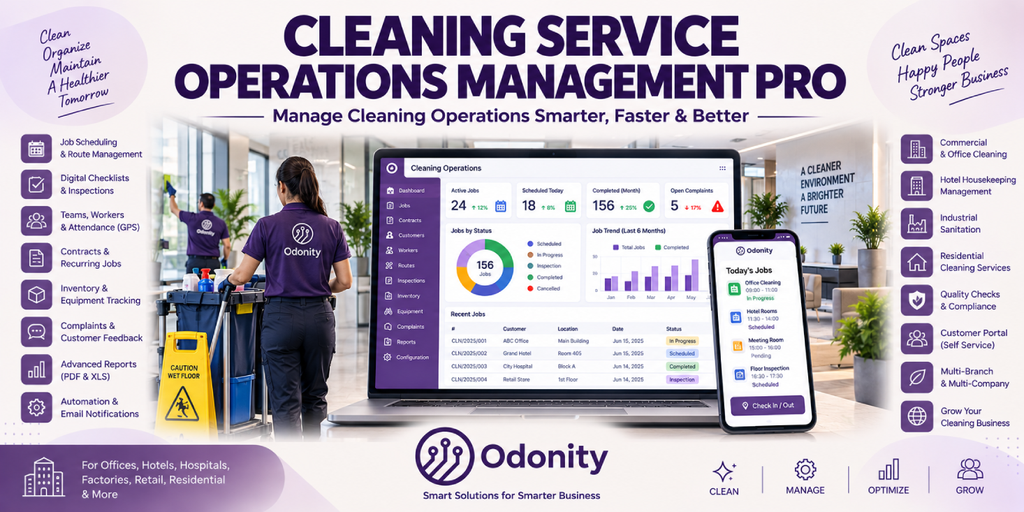
A complete advanced-grade Cleaning Service Operations Management platform for Odoo. Manage cleaning jobs, recurring contracts, workers, routes, attendance, inspections, inventory, equipment, complaints, customer communication, and operational reporting from one connected system.

Cleaning Job Management Recurring Contracts Workforce & Teams GPS Attendance Quality Inspections Route Management Customer Portal PDF & Excel Reports

How the Cleaning Service Workflow Works

From contract and scheduling to job completion, inspection, attendance, and customer feedback — every operation is connected and tracked.

Create Contract

Define customer, locations, service scope, value, billing cycle, SLA, and renewal details

Schedule Jobs

Generate recurring jobs and assign schedules, teams, workers, vehicles, and service locations

Perform Cleaning

Workers complete digital checklists, capture photos, record GPS attendance, and update job progress

Inspect Quality

Supervisors review cleaning criteria, capture evidence, score quality, and approve or request rework

Complete & Review

Complete jobs, notify customers, collect feedback, resolve complaints, and analyze performance

Everything You Need for Professional Cleaning Operations

Manage field cleaning operations, people, service quality, materials, customer relationships, and recurring services from one connected platform.

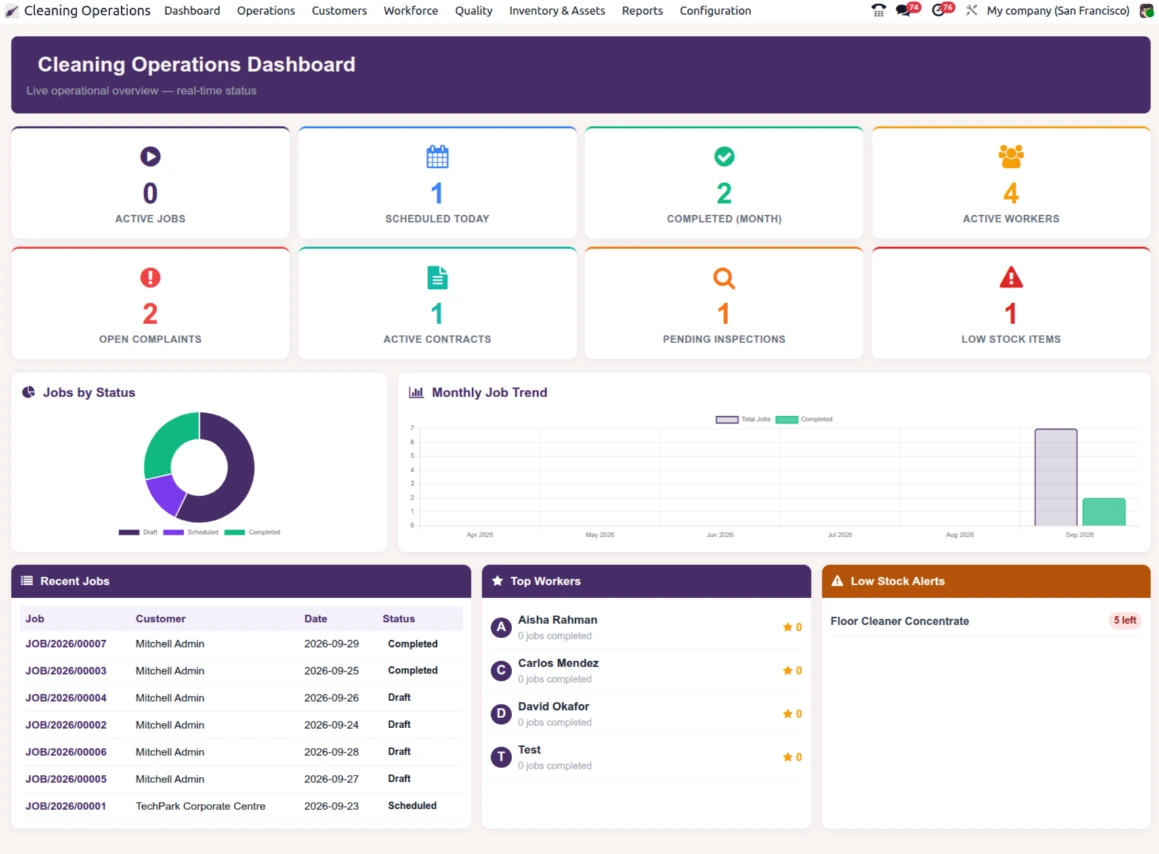
Live Operations Dashboard
  • Real-time KPI cards for jobs, workers, contracts, inspections, complaints, and low stock
  • Jobs by status doughnut chart
  • 6-month total vs completed job trend
  • Recent jobs activity and top workers leaderboard
  • Low stock alert panel
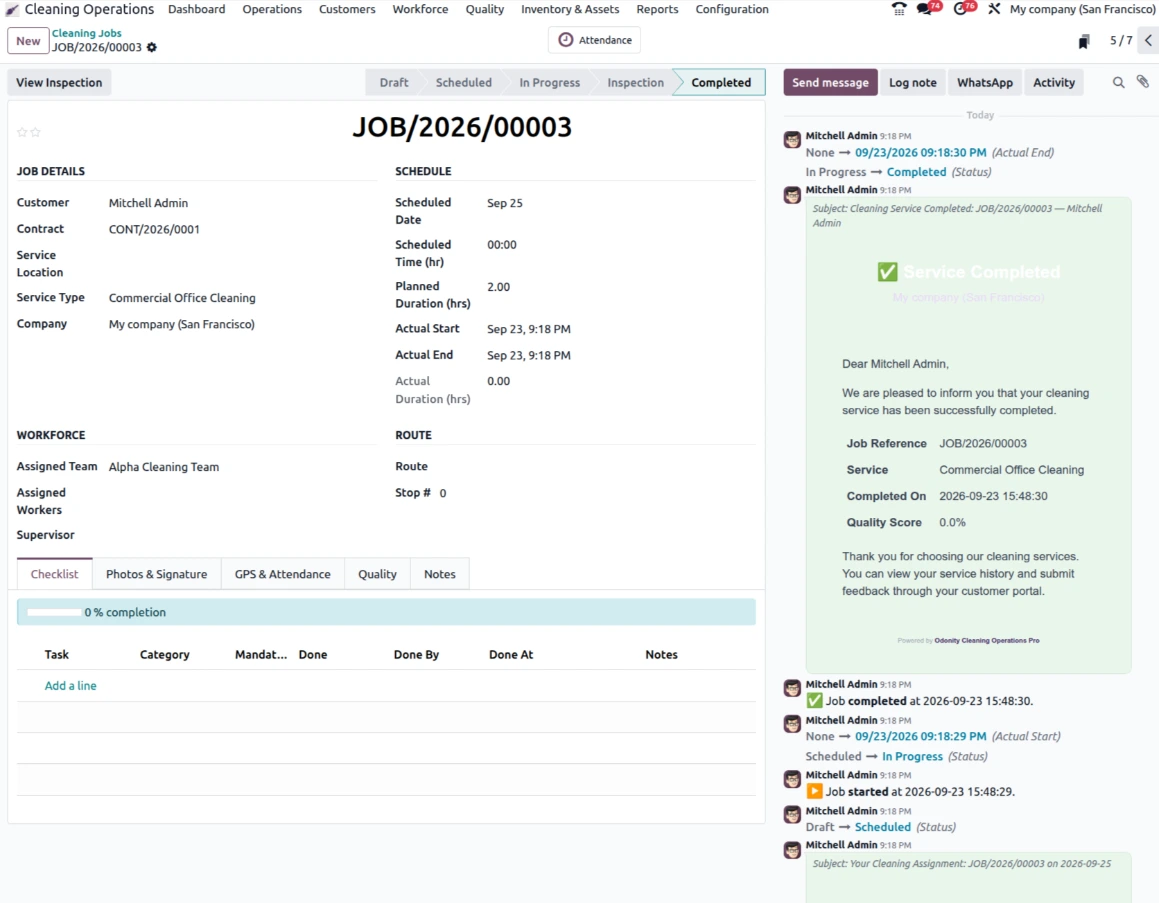
Cleaning Job Management
  • Draft → Scheduled → In Progress → Inspection → Completed lifecycle
  • Missed and Cancelled job handling
  • Normal, High, and Urgent priorities
  • Digital checklist with completion progress
  • Before/after photos and customer signature
  • Worker signature and GPS check-in/check-out
Service Contracts
  • Draft → Active → On Hold → Renewal → Expired → Cancelled lifecycle
  • Daily, weekly, bi-weekly, and monthly recurring schedules
  • Automatic job generation from active contracts
  • Contract value, billing cycle, and SLA response time
  • Service scope and renewal reminders
Workforce, Teams & Attendance
  • Worker profiles, skills, certifications, and training history
  • QR code per worker for attendance
  • Team assignment with team leader
  • Vehicle assignment and shift planning
  • GPS, QR, manual, and mobile attendance methods
  • Hours, overtime, and attendance analytics
Routes & Quality Inspections
  • Group daily jobs by team and vehicle
  • Stop sequence and estimated vs actual distance
  • Route efficiency tracking
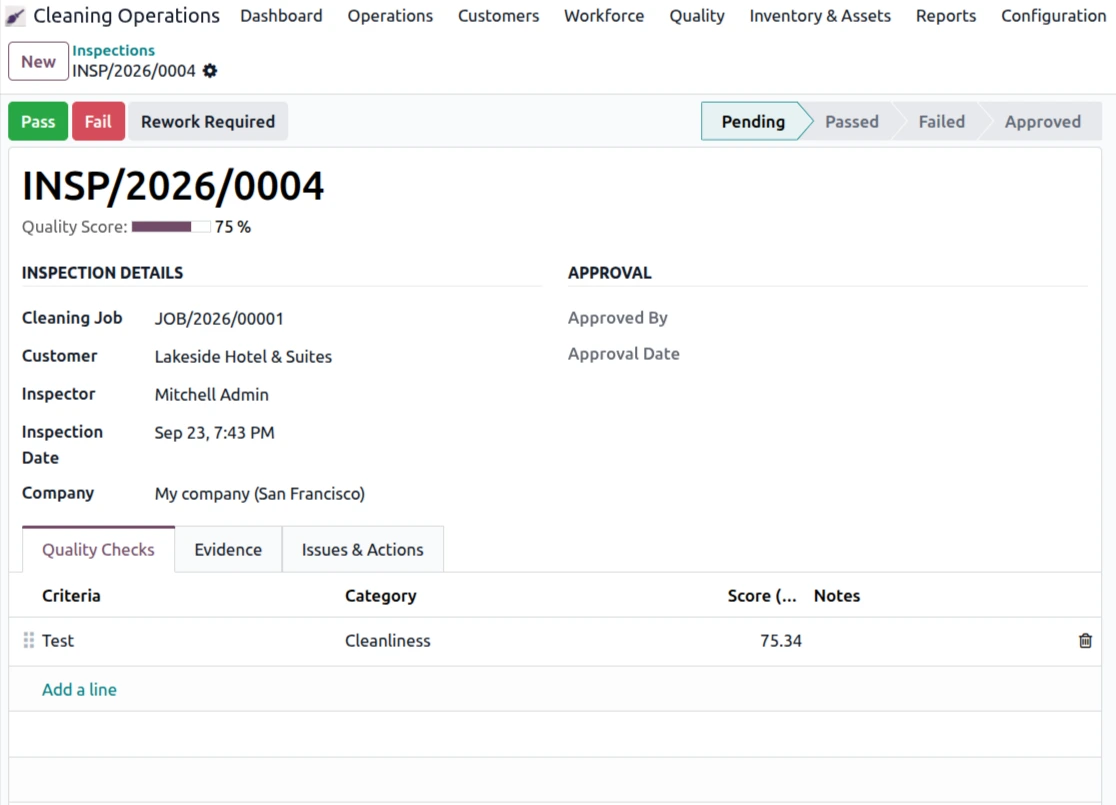
  • Inspection scoring from 0–100 per criterion
  • Cleanliness, hygiene, safety, equipment, and presentation criteria
  • Pass, Fail, and Rework workflow with supervisor approval
Inventory & Equipment
  • Cleaning materials and chemical stock tracking
  • Usage history linked to cleaning jobs
  • Low stock alerts via automation
  • Equipment lifecycle: Available → In Use → Maintenance → Retired
  • Maintenance scheduling and due alerts
  • QR code per equipment
Complaints & Customer Portal
  • Complaint severity: Low, Medium, High, Critical
  • Overdue complaint auto-escalation
  • Customer complaint submission through the portal
  • Evidence photo upload and resolution tracking
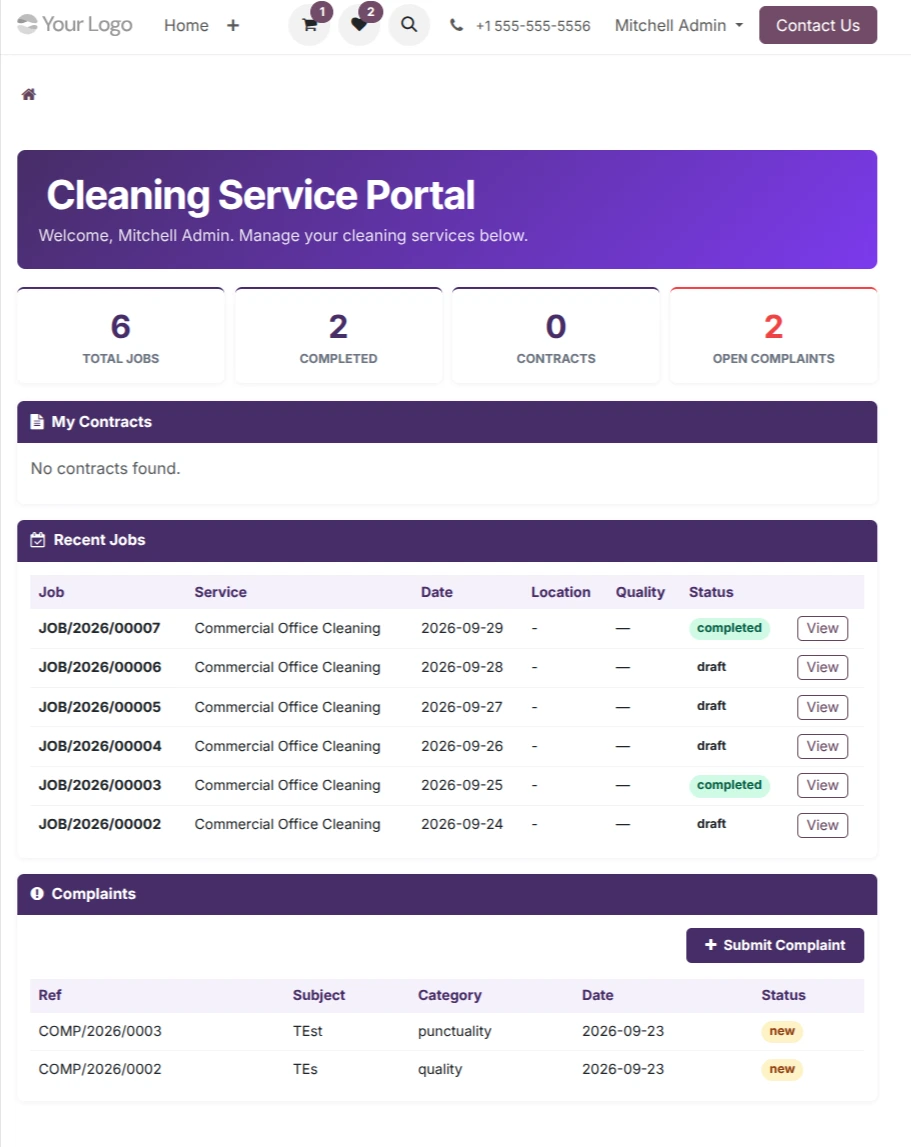
  • Customer KPI summary with total jobs, completed jobs, contracts, and complaints
  • Job history with quality scores
  • Job feedback and 1–5 star service rating
PDF, Excel & Smart Automation
  • Cleaning Job Report with checklist, signatures, and quality score
  • Quality Inspection Report with results, issues, and corrective actions
  • Professional Service Contract report with signature blocks
  • 7 Excel exports covering jobs, contracts, attendance, inspections, inventory, complaints, and workers
  • Automatic missed job marking and recurring job generation
  • Contract renewal, low stock, equipment maintenance, and complaint escalation alerts

Module Screenshots

Live Cleaning Operations Dashboard — KPIs, Job Trends, Status Analytics & Worker Performance
Cleaning Job Record — Schedule, Checklist, Worker Assignment, Photos & GPS Attendance
Quality Inspection — Criteria Scoring, Evidence Photos, Pass/Fail/Rework & Supervisor Approval
Customer Portal — Contracts, Job History, Quality Scores, Complaints & Feedback
Perfect For

Cleaning and facility service businesses that need structured field operations, recurring service management, workforce coordination, and quality visibility.

Commercial Cleaning Agencies

Manage recurring customer contracts, cleaning jobs, workforce assignments, inspections, and service quality.

Hotels & Housekeeping

Coordinate cleaning teams, schedules, service locations, inspections, attendance, and housekeeping quality.

Industrial Sanitation

Track scheduled sanitation operations, teams, materials, inspections, equipment, and corrective actions.

Residential Cleaning

Manage recurring or scheduled residential cleaning services with worker assignment and customer feedback.

Facility Management

Centralize service contracts, cleaning operations, workforce, equipment, complaints, and customer communication.

Healthcare Cleaning

Maintain structured cleaning schedules, hygiene checks, inspections, materials, equipment, and issue tracking.

Multi-Site Cleaning Teams

Organize daily routes, service stops, vehicles, workers, distance tracking, and route efficiency.

Cleaning Workforce Operations

Manage workers, teams, shifts, certifications, attendance, vehicles, productivity, and performance feedback.

Installation & Usage

Install the module, configure your cleaning operations, and start managing contracts, jobs, teams, and service quality.

1
Install Module

Install Cleaning Service Operations Pro in your Odoo environment

2
Configure Services

Set up Service Types, Areas, and Checklist Templates

3
Add Customers

Create customers, service locations, access details, and operational contacts

4
Set Up Teams

Create teams, assign workers, vehicles, shifts, routes, and attendance methods

5
Go Live

Create contracts and start generating cleaning jobs and managing operations

Support & Customization

Need assistance, custom cleaning workflows, portal changes, reporting, or integration support?

App by ODONITY — Smart Solutions for Smarter Business

Support & Service Policy

To ensure fair usage, consistent quality, and reliable service for all customers, Odonity provides structured support under the following terms:

✔ Support Coverage (65 Days)
  • Free support is provided for 65 days from the date of purchase.
  • Support includes installation guidance, setup assistance, and usage-related queries.
  • Bug fixing is included only if the module is not functioning as described in official features.
✔ Definition of Bug
  • A bug refers to a feature not working as documented or demonstrated.
  • Any request to modify behavior, logic, or add new functionality is considered customization.
✘ Not Included in Free Support
  • Custom development, feature enhancements, or business-specific changes.
  • Third-party module conflicts or integration issues.
  • Server configuration, hosting, deployment, or infrastructure-related problems.
  • Debugging or fixing issues outside the purchased module.
✔ Scope Limitation
  • Support is strictly limited to the purchased module only.
  • It does not include full system debugging, database correction, or unrelated module issues.
✔ Version & Compatibility
  • The module is guaranteed to work only with the specified Odoo version mentioned on the product page.
  • Compatibility with customized or heavily modified systems is not guaranteed.
✔ Demo & Representation Disclaimer
  • All screenshots, videos, and demos are for reference purposes only.
  • Actual behavior may vary depending on system configuration and installed modules.
✔ Support Process
  • Support is provided via email ([email protected]) or through the customer portal (order communication linked to your purchase).
  • For faster resolution, please include your order reference and detailed issue description in your communication.
  • Typical response time is within 24–48 business hours.
  • Customers must provide necessary access (Odoo/backend/server if required).
  • Delays in providing access or required information may delay resolution.
✔ Paid Support & Customization
  • All customization, enhancements, or new feature requests are treated as paid services.
  • Support after 65 days is available under paid plans.
✔ Customer Responsibilities
  • Maintain proper backups before installing or updating the module.
  • Test changes in a staging environment before applying to production.
  • Ensure the system meets basic Odoo requirements and compatibility.
✔ License Scope
  • Support is valid only for the purchased license and single Odoo instance.
  • Usage across multiple databases or environments may require additional licensing.
⚠ Important Notes
  • Odonity is not responsible for data loss, misconfiguration, or system failures.
  • We are not liable for conflicts caused by third-party modules or custom code.
  • Unauthorized modification of the module may void support eligibility.
  • Support priority is handled in order; urgent or immediate support is not guaranteed.

Our goal is to provide reliable, transparent, and professional support while maintaining fairness and sustainability for all customers.


Odoo Proprietary License v1.1 - Strict Commercial Use

© 2026-Present Odonity. All Rights Reserved.

Module Name: Cleaning Service Operations Pro | Field Workforce & Contract Management | All-in-One Cleaning Platform (By Odonity)
License Owner: Odonity (https://www.odonity.com)
Support Email: [email protected]

This software is protected by copyright laws and international treaties. It is licensed, not sold. You are granted a non-transferable, non-sublicensable, and non-exclusive license to use this software ONLY under the terms below:

--------------------------------------------
STRICT TERMS OF USE
--------------------------------------------

PERMITTED:

- Use the module in one Odoo production instance only (with staging/test allowed only for that instance).
- Use for internal company operations.
- Request support, upgrades, or customization services from Odonity.

PROHIBITED WITHOUT WRITTEN PERMISSION FROM ODONITY:

- Modifying, altering, or extending the source code in any way.
- Reselling, sublicensing, or redistributing any part of the module.
- Sharing the code with third parties, including freelancers or other vendors.
- Uploading this module to public or private repositories, websites, or forums.
- Creating derivative works or using snippets in other modules.
- Using the module as a base to develop similar competing products.

WARNING:

This software contains branding, code-level markers, and security tracking for anti-piracy purposes. Tampering with these or violating this license may result in:

- Permanent termination of your usage rights
- Legal action under local and international intellectual property laws
- Immediate take-down notices for marketplaces and hosting providers

--------------------------------------------
LICENSE VERIFICATION & SUPPORT
--------------------------------------------

License Keys / Validation (optional): Odonity reserves the right to implement license key checks in future versions.
Support is only available to verified license holders.
Invoice or proof of purchase must be retained for all license claims.

For official support, licensing clarifications, or enterprise usage, please contact:
[email protected] | https://www.odonity.com

--------------------------------------------

BY INSTALLING THIS MODULE, YOU AGREE TO BE BOUND BY ALL TERMS ABOVE.

Unauthorized use, reproduction, or redistribution is strictly prohibited.

Specifications

Version 19, 18