Smart Hire Pro
Employee Offer Letter Automation | Digital Acceptance | Multi-Stage Workflow | PDF Generation
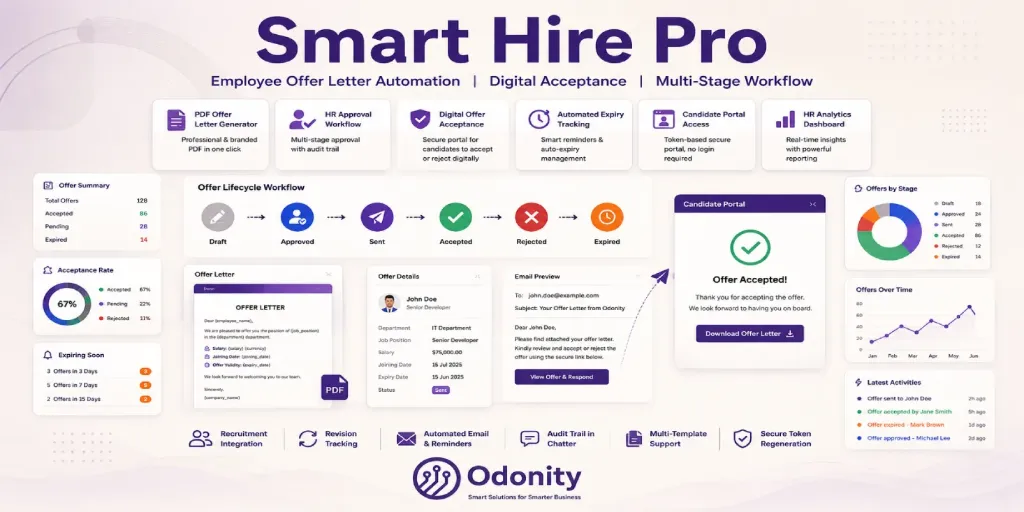
Smart Hire Pro is not just an offer letter generator — it is a complete hiring finalization command center built natively in Odoo. From creation to digital candidate acceptance, every step is tracked, automated, and professionally managed.
What is Smart Hire Pro?
Smart Hire Pro bridges the gap between "candidate selected" and "employee onboarded" with a structured, trackable, and fully automated offer management workflow — all inside Odoo. HR teams can create branded offer letters, route them through an optional approval gate, send them by email with a PDF attachment, and let candidates accept or decline digitally via a secure link — no Odoo backend access required.
Offers automatically expire on the configured date, reminders go out to candidates before expiry, and every action is logged in the Odoo Chatter for full auditability. Re-issued offers are versioned automatically. Analytics views give HR managers real-time insight into acceptance rates and department-wise hiring metrics.
Key Features
How It Works — Offer Lifecycle
Draft
Create offer, select template, fill terms and candidate details.
Approval
Optional HR Manager approval gate before sending. Configurable in settings.
Sent
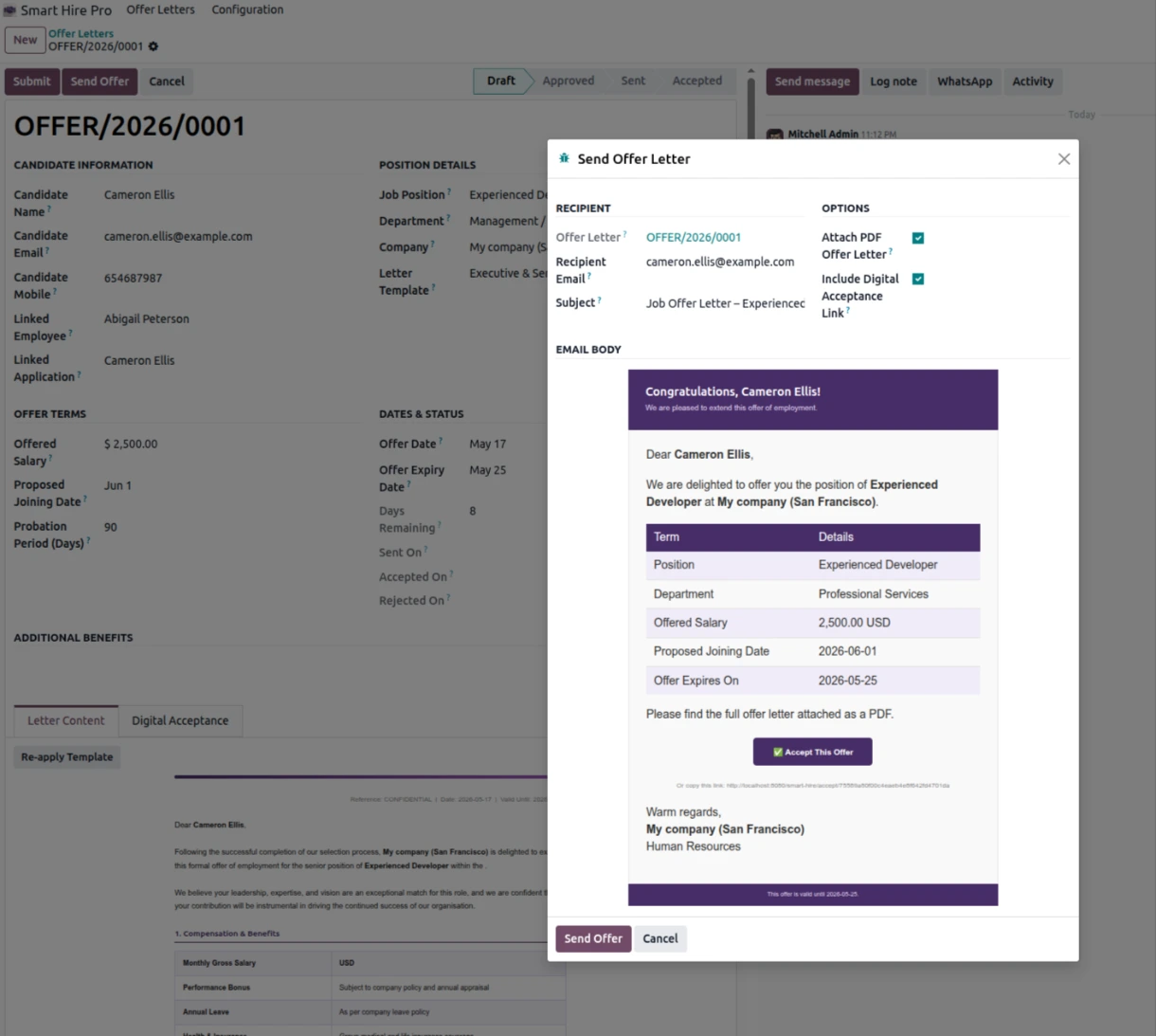
Email sent with PDF and unique digital acceptance link for the candidate.
Accepted
Candidate clicks Accept. Status updates instantly. Chatter logged with IP.
Rejected
Candidate declines with optional reason. HR notified via Chatter.
Expired
Scheduler auto-expires offer past expiry date. Reset to draft to reissue.
Digital Acceptance Portal
When an offer is sent, a unique secure URL is generated automatically — for example
https://yoursite.com/smart-hire/accept/45768cd679054e54821cee41ff00175b.
The candidate opens this link in any browser with no login required and sees a beautifully formatted portal page.
Below are all five portal states the system handles automatically.
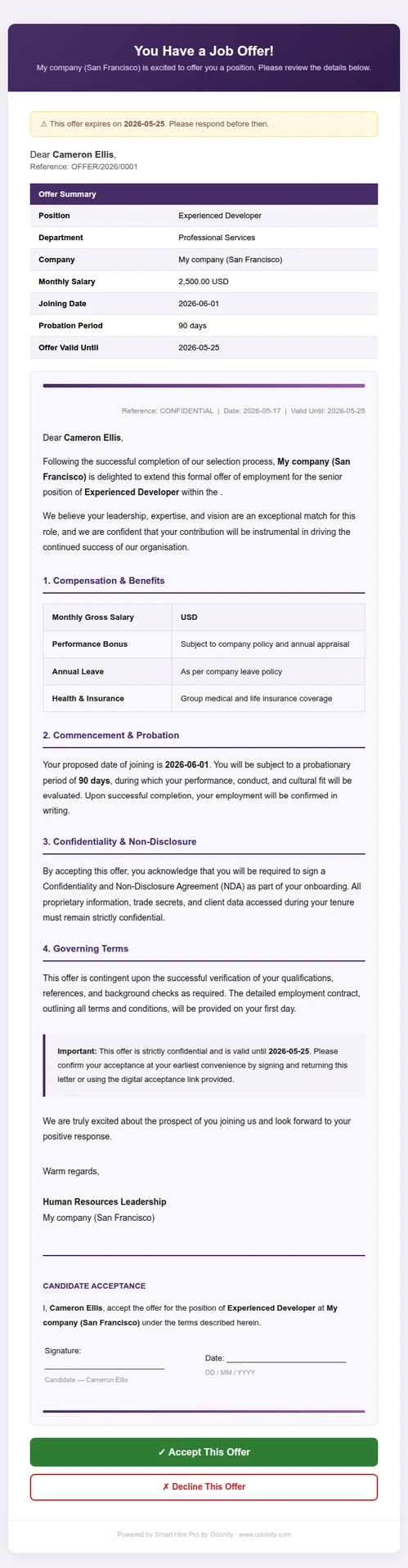
Offer Review & Decision
- Candidate name, reference, and expiry alert shown prominently
- Full offer terms table — position, department, salary, joining date, probation
- Custom letter body preview rendered inline
- Additional benefits section if configured
- Green Accept This Offer button — one-click POST confirmation
- Red Decline This Offer toggle — expands a reason textarea before submitting
Offer Accepted
- Green confirmation screen with congratulations message
- Candidate name, position, and joining date displayed
- Offer state instantly changed to Accepted in Odoo
- Accepted timestamp and candidate IP address logged in Chatter
- HR team notified via Chatter message
Offer Declined
- Professional decline screen with thank-you message
- Candidate's optional decline reason recorded
- Offer state changed to Rejected in Odoo
- Declined timestamp logged with reason in Chatter
- HR encouraged to follow up or reissue with revision
Invalid or Expired Link
- Shown when token does not exist in the database
- Shown when offer is in Cancelled or Expired state
- Dynamic error message explains current status
- Candidate advised to contact HR for a new link
- No sensitive offer data is exposed
Already Accepted
- Shown when candidate reopens a link they already acted on
- Displays original acceptance date and timestamp
- Friendly message — no duplicate submissions possible
- Candidate reassured that their acceptance is on record
- HR onboarding message shown
Token Security
- Each offer gets a cryptographically unique 32-character hex token
- Token is regenerated on every revision reset
- Old tokens are invalidated when offer is cancelled or reissued
- No Odoo session or login required — fully public route
- Candidate IP is logged on acceptance for audit trail
3 Built-in Letter Templates
Smart Hire Pro ships with three professionally designed offer letter templates ready to use immediately after installation. All support dynamic placeholders that auto-fill from the offer record.
Standard Employment Offer
Best for general full-time hires across any department
- Clean serif-style layout with formal tone
- Offer terms table with purple header row
- Probation and notice period clause
- Offer validity paragraph with expiry date
- Acceptance declaration with signature lines
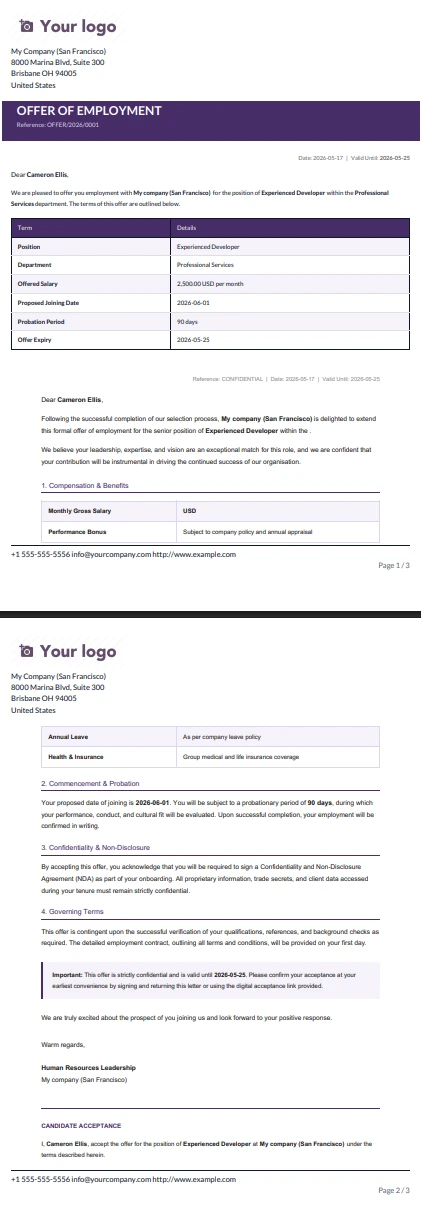
Executive & Senior Role Offer
Best for Manager, Director, C-level and senior specialist positions
- Premium layout with gradient accent bars
- Sectioned structure: Compensation, Commencement, NDA, Governing Terms
- Performance bonus and insurance rows
- Confidential notice callout box
- Formal candidate acceptance block
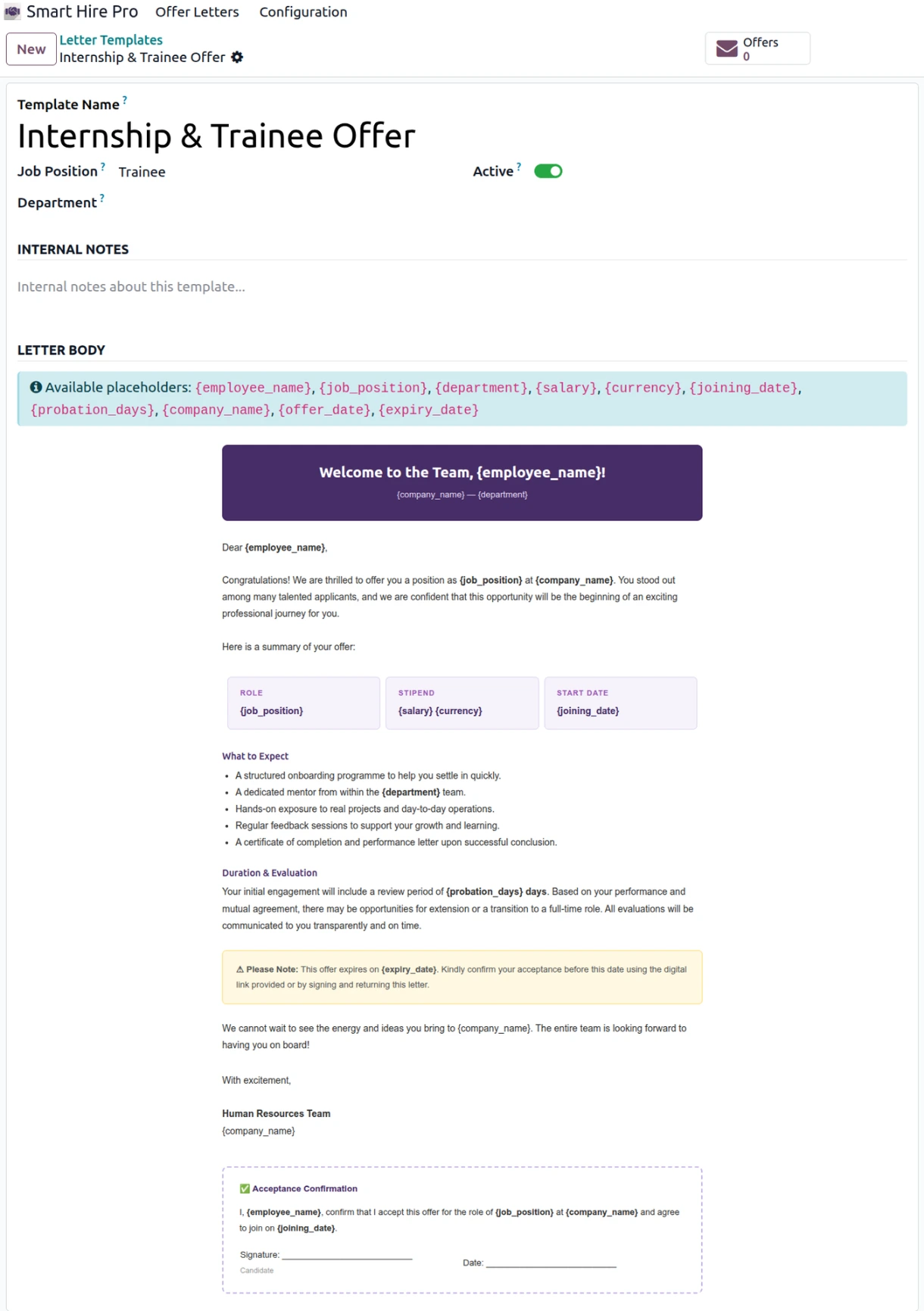
Internship & Trainee Offer
Best for interns, fresh graduates, trainees and entry-level positions
- Friendly, encouraging tone with congratulatory banner
- 3-column summary card layout for role, stipend, and start date
- "What to Expect" bullet section with mentor and feedback details
- Conversion to full-time mention
- Dashed-border acceptance block
{employee_name}
{job_position}
{department}
{salary}
{currency}
{joining_date}
{probation_days}
{company_name}
{offer_date}
{expiry_date}
Smart Hire Pro vs Basic Offer Letter Apps
| Feature | Smart Hire Pro | Basic Apps |
|---|---|---|
| PDF Offer Letter Generation | ✔ | ✔ |
| Multi-Stage Workflow (8 States) | ✔ | ✘ |
| HR Manager Approval Gate | ✔ | ✘ |
| Digital Acceptance URL (No Login) | ✔ | ✘ |
| Candidate Decline with Reason | ✔ | ✘ |
| 5 Portal States (Accept / Decline / Invalid / Already Accepted / Expired) | ✔ | ✘ |
| Offer Expiry & Auto-Expire Scheduler | ✔ | ✘ |
| Automated Reminder Emails Before Expiry | ✔ | ✘ |
| Revision Tracking with New Token | ✔ | ✘ |
| Analytics — Graph + Pivot + Kanban | ✔ | ✘ |
| Recruitment App (hr.applicant) Integration | ✔ | ✘ |
| 3 Built-in Offer Letter Templates | ✔ | ✘ |
| Configurable Settings Panel | ✔ | ✘ |
| Odoo 19 Fully Compliant | ✔ | ✘ |
Perfect For
- HR Departments — manage the complete offer lifecycle for all hires from one place inside Odoo
- Growing Companies — standardise your hiring confirmation process across departments and locations
- Recruitment Agencies — send branded offer letters on behalf of clients and track candidate responses digitally
- Compliance-Driven Organisations — approval gate, full audit trail, IP logging and timestamped acceptance records
- Internship & Training Programmes — use the dedicated Internship template with friendly tone and structured onboarding details
Module Screenshots
Offer Letter Form View — Full Workflow
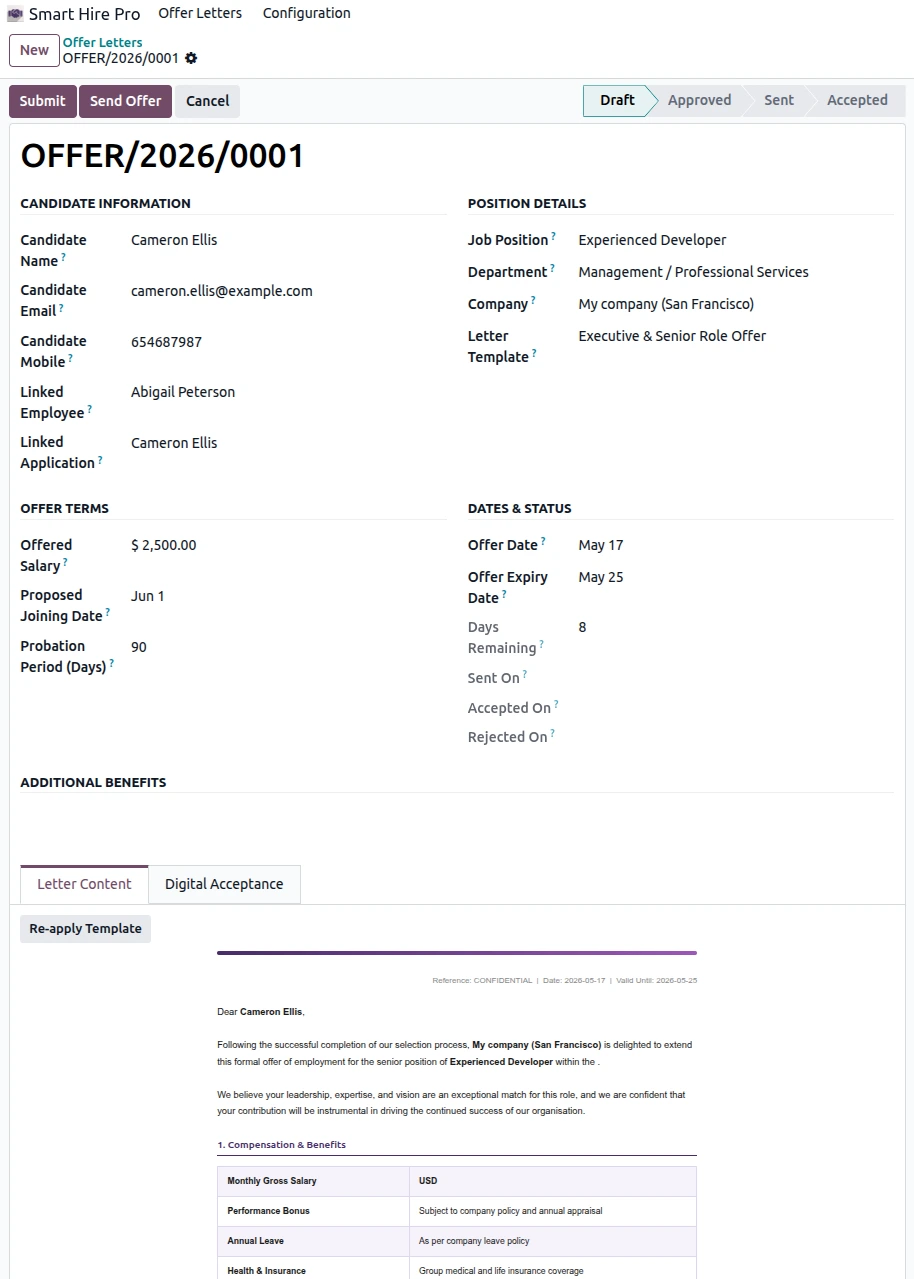
Send Offer Wizard — Email with PDF Attachment
Candidate Portal Page — Digital Acceptance
PDF Offer Letter Output
Letter Template Builder with Placeholders
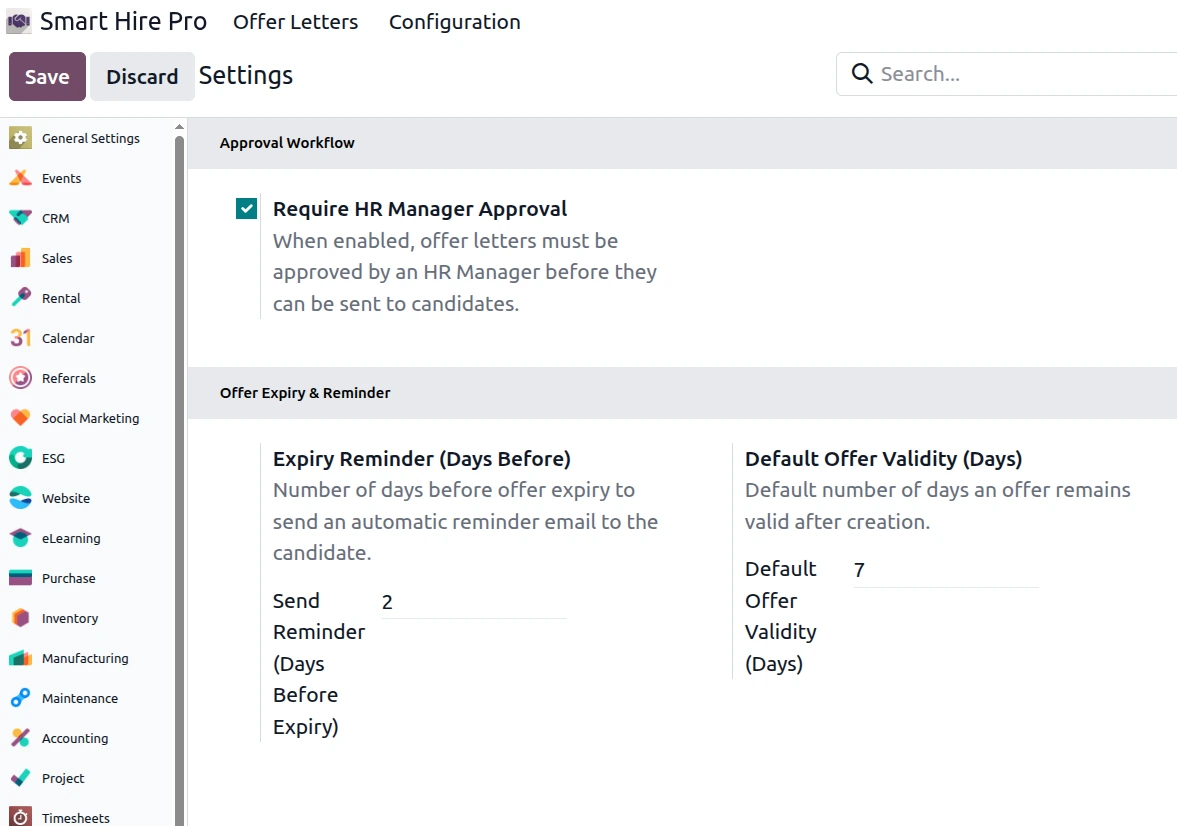
Smart Hire Pro Settings Panel
Installation & Usage
Installation
odnt_smart_hire folder to your Odoo custom addons directory.Usage
- Go to Settings → Smart Hire Pro to configure approval gate, reminder days and default expiry.
- Go to Smart Hire Pro → Configuration → Letter Templates to manage offer templates.
- Go to Smart Hire Pro → Offer Letters → All Offers to create a new offer letter.
- Select a template, fill candidate details and offer terms — body auto-populates.
- Click Submit → (Approve if required) → Send Offer to email the candidate.
- Candidate opens the link and clicks Accept or Decline — status updates instantly in Odoo.
- Use Graph and Pivot views for HR analytics and offer performance tracking.
Support & Customization
Need assistance, custom features, or version upgrades? We are here to help.
- Email: [email protected]
- Website: www.odonity.com
Support & Service Policy
To ensure fair usage, consistent quality, and reliable service for all customers, Odonity provides structured support under the following terms:
✔ Support Coverage (65 Days)
- Free support is provided for 65 days from the date of purchase.
- Support includes installation guidance, setup assistance, and usage-related queries.
- Bug fixing is included only if the module is not functioning as described in official features.
✔ Definition of Bug
- A bug refers to a feature not working as documented or demonstrated.
- Any request to modify behavior, logic, or add new functionality is considered customization.
✘ Not Included in Free Support
- Custom development, feature enhancements, or business-specific changes.
- Third-party module conflicts or integration issues.
- Server configuration, hosting, deployment, or infrastructure-related problems.
- Debugging or fixing issues outside the purchased module.
✔ Scope Limitation
- Support is strictly limited to the purchased module only.
- It does not include full system debugging, database correction, or unrelated module issues.
✔ Version & Compatibility
- The module is guaranteed to work only with the specified Odoo version mentioned on the product page.
- Compatibility with customized or heavily modified systems is not guaranteed.
✔ Demo & Representation Disclaimer
- All screenshots, videos, and demos are for reference purposes only.
- Actual behavior may vary depending on system configuration and installed modules.
✔ Support Process
- Support is provided via email ([email protected]) or through the customer portal (order communication linked to your purchase).
- For faster resolution, please include your order reference and detailed issue description in your communication.
- Typical response time is within 24–48 business hours.
- Customers must provide necessary access (Odoo/backend/server if required).
- Delays in providing access or required information may delay resolution.
✔ Paid Support & Customization
- All customization, enhancements, or new feature requests are treated as paid services.
- Support after 65 days is available under paid plans.
✔ Customer Responsibilities
- Maintain proper backups before installing or updating the module.
- Test changes in a staging environment before applying to production.
- Ensure the system meets basic Odoo requirements and compatibility.
✔ License Scope
- Support is valid only for the purchased license and single Odoo instance.
- Usage across multiple databases or environments may require additional licensing.
⚠ Important Notes
- Odonity is not responsible for data loss, misconfiguration, or system failures.
- We are not liable for conflicts caused by third-party modules or custom code.
- Unauthorized modification of the module may void support eligibility.
- Support priority is handled in order; urgent or immediate support is not guaranteed.
Our goal is to provide reliable, transparent, and professional support while maintaining fairness and sustainability for all customers.
Odoo Proprietary License v1.1 - Strict Commercial Use

© 2026-Present Odonity. All Rights Reserved.

Module Name: Smart Hire Pro | Employee Contract & Offer Letter Automation (By Odonity)
License Owner: Odonity (https://www.odonity.com)
Support Email: [email protected]

This software is protected by copyright laws and international treaties. It is licensed, not sold. You are granted a non-transferable, non-sublicensable, and non-exclusive license to use this software ONLY under the terms below:

--------------------------------------------
STRICT TERMS OF USE
--------------------------------------------

PERMITTED:

- Use the module in one Odoo production instance only (with staging/test allowed only for that instance).
- Use for internal company operations.
- Request support, upgrades, or customization services from Odonity.

PROHIBITED WITHOUT WRITTEN PERMISSION FROM ODONITY:

- Modifying, altering, or extending the source code in any way.
- Reselling, sublicensing, or redistributing any part of the module.
- Sharing the code with third parties, including freelancers or other vendors.
- Uploading this module to public or private repositories, websites, or forums.
- Creating derivative works or using snippets in other modules.
- Using the module as a base to develop similar competing products.

WARNING:

This software contains branding, code-level markers, and security tracking for anti-piracy purposes. Tampering with these or violating this license may result in:

- Permanent termination of your usage rights
- Legal action under local and international intellectual property laws
- Immediate take-down notices for marketplaces and hosting providers

--------------------------------------------
LICENSE VERIFICATION & SUPPORT
--------------------------------------------

License Keys / Validation (optional): Odonity reserves the right to implement license key checks in future versions.
Support is only available to verified license holders.
Invoice or proof of purchase must be retained for all license claims.

For official support, licensing clarifications, or enterprise usage, please contact:
[email protected] | https://www.odonity.com

--------------------------------------------

BY INSTALLING THIS MODULE, YOU AGREE TO BE BOUND BY ALL TERMS ABOVE.

Unauthorized use, reproduction, or redistribution is strictly prohibited.